

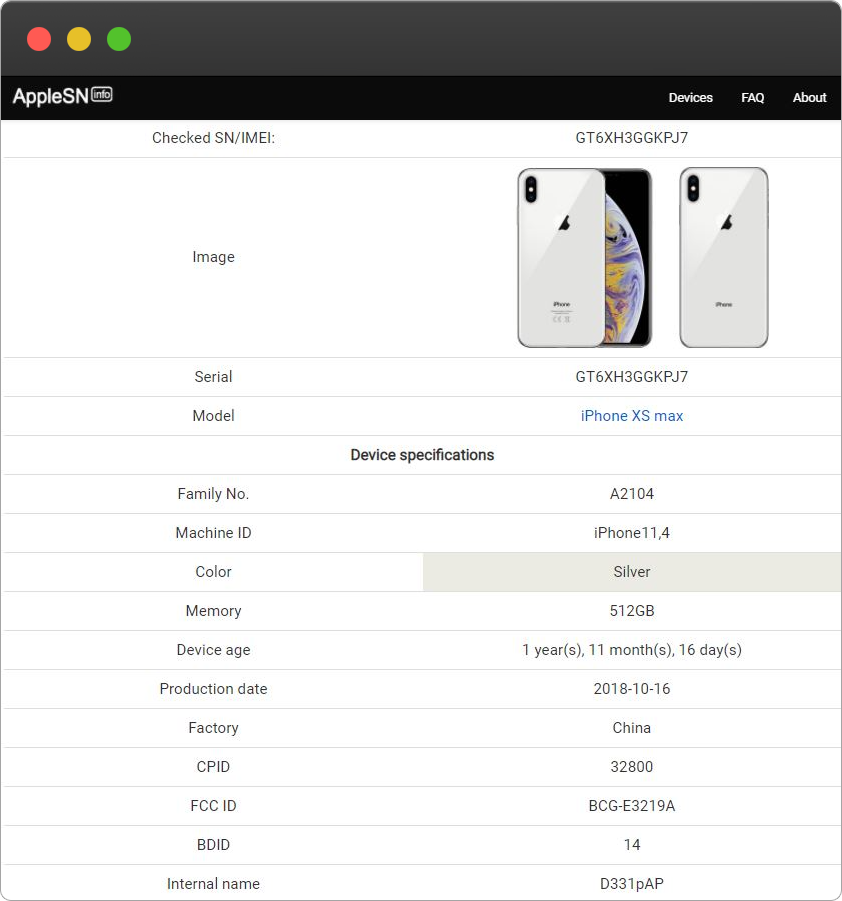
Your iPhone is more than just a sleek device in your pocket—it’s a combination of advanced technology, careful craftsmanship, and sometimes, a surprising history. Whether you bought it new, received it as a gift, or purchased a second-hand model, there’s a lot you might not know about your device. That’s where an Apple Serial Number Check comes in. With it, you can uncover your iPhone’s manufacturing date, model information, and more—giving you clarity and confidence in just a few seconds.
What Is an Apple Serial Number?
Every iPhone comes with a unique serial number, essentially serving as its digital fingerprint. No two iPhones share the same code, making it an essential tool for verification, repairs, and even resale.
Why Apple Assigns Serial Numbers
Apple uses serial numbers to:
-
Track production details
-
Verify authenticity
-
Determine warranty coverage
-
Identify model and configuration
For iPhone owners, the serial number is a window into the life of the device—telling you when and where it was made and what version it really is.
Why Knowing Your iPhone’s Manufacturing Date Matters
The manufacturing date is not just trivia—it can be surprisingly important.
Understand Device Age
Knowing when your iPhone was made helps you determine:
-
How old the device really is
-
If it might be nearing the end of its warranty
-
Whether it’s likely to receive future software updates
Make Smarter Purchases
If you’re buying a second-hand iPhone, knowing the manufacturing date prevents you from overpaying for an older model or a device that has been refurbished.
Verify Authenticity
Counterfeit and refurbished iPhones can sometimes be misrepresented. A serial number check can reveal inconsistencies between the claimed age and actual manufacturing date, helping you avoid scams.
How to Find Your iPhone’s Serial Number
Before you can check your device, you need the serial number. Apple makes it easy.
On Your iPhone
-
Open Settings
-
Tap General
-
Select About
-
Scroll to find the serial number
Other Locations
-
On the original packaging
-
In your Apple ID account under Devices
-
On the SIM tray for some older models
With the serial number in hand, you’re ready to uncover your iPhone’s manufacturing date and model info.
What Information Can a Serial Number Reveal?
An Apple serial number can provide much more than just the manufacturing date.
Model Information
By decoding the serial number, you can identify:
-
Exact iPhone model and generation
-
Storage capacity
-
Original color and configuration
This ensures you know exactly what device you have or are purchasing.
Manufacturing Details
The serial number also reveals:
-
The factory where your iPhone was produced
-
The production week and year
This insight can help verify authenticity, understand device age, and even trace regional production differences.
Warranty and Service Status
Serial number checks can also tell you:
-
If your iPhone is still under warranty
-
When the warranty or AppleCare coverage expires
-
Eligibility for official Apple service
Why Serial Number Checks Are Essential
For Buyers
When buying a new or used iPhone, a serial number check ensures you get exactly what you pay for. It protects against counterfeit devices and helps confirm device age, condition, and model specifications.
For Sellers
Providing serial number information builds trust with buyers, proves authenticity, and supports fair pricing. Transparency in device history makes selling smoother and faster.
For Owners
Even if you’re not buying or selling, a serial number check helps you track warranty coverage, verify repairs, and better understand your iPhone’s lifecycle.
Common Misconceptions About check iPhone warranty Checks
“It’s Only for Experts”
Anyone can check a serial number with a few taps on their iPhone. No technical skills are required.
“It Exposes Personal Data”
Serial numbers do not reveal your photos, messages, or personal files—they only show device-related information.
“Older iPhones Don’t Benefit”
Even discontinued models can be verified, helping with resale, repairs, or understanding device lifespan.
Tips for a Complete Device Verification
To get the most from a serial number check:
-
Inspect the Device: Check for scratches, signs of wear, or replaced parts.
-
Check Battery Health: Replacement batteries are common in refurbished devices.
-
Verify Warranty: Ensure coverage aligns with the manufacturing date for repairs or AppleCare options.
Combining these steps with a serial number check gives you the clearest picture of your iPhone.
Final Thoughts
An Apple Serial Number Check is a fast, simple, and powerful way to decode your iPhone’s history. From manufacturing date to model details and warranty status, a few seconds can give you a complete view of your device.
Whether you’re buying, selling, or simply curious, understanding your iPhone’s serial number gives you confidence, protects your investment, and ensures you know exactly what you own. Your iPhone has a story—don’t leave it untold. Unlock it today with a quick serial number check.